Accessing RDS instance through Open-vpn

This blogs deals with AWS RDS setup and Openvpn. Due to lots of cybersecurity threats going on we have to keep our RDS/DB’s very secure to avoid any threats for our data.

While creating RDS instance, we have the option of keeping the instance public or private. Now how to access instance if we keep it private. Its always recommended to keep RDS/DB private, but how to do so.

In this setup, 1 – vpc is present which has both public and private subnets, 1 -RDS instance which is deployed on private subnet of the same vpc along with public_accessible=false and 1 – Ec2 instance which is delpoyed on public subnet of the same vpc.

Reference:

Now, in order to setup rds instance and vpc, you can either go through aws console or terraform(IaC). I have used terraform.

Steps:

  1. Create vpc.
  2. Create ec2-instance and install openvpn-server on it.
  3. Create RDS instance.

Attached screenshots for POC:

  1. terraform apply output
  2. terraform output
  3. ec2 openvpn from aws console
  4. openvpn-client
  5. db-client

Reference:

Repo: link

Openvpn_setup: link

Building infrastructure for AWS using terraform

What is terraform?

Terraform is an open-source infrastructure as code, software tool created by HashiCorp. It enables users to define and provision data center infrastructure using a declarative configuration language known as HashiCorp Configuration Language (HCL), or optionally JSON. Terraform supports all cloud providers.

In this article i will show how to build simple architecture in aws using terraform.

First install terraform on your system. Based on your Operating system download terrafrom.

Let’s start with ec2-creation. I am using ubuntu 18.04 as base OS and instance type t2.micro which falls under free-tier.

Ec2-resource creation:

resource "aws_instance" "MyFirstInstance"{
#add ami,instance,tag values to create instance
ami = "ami-02354e95b39ca8dec"
instance_type = "t2.micro"
vpc_security_group_ids = ["${aws_security_group.allow_ssh.id}"]
subnet_id = "${aws_subnet.PublicSubnet.id}"
tags = {
Name = "MyEc2Instance"
}


Elastic ip creation:

resource "aws_eip" "EipForInstance"{ instance = "${aws_instance.MyFirstInstance.id}" vpc = true tags = { Name = "Ec2_instance_ip" }}

VPC Creation: Here for demo i have allowed all ips for ssh. Don’t follow this practice in dev/production server

resource "aws_vpc" "mainvpc" { cidr_block = "10.0.0.0/16" instance_tenancy = "default" enable_dns_hostnames = true
tags = { Name = "VPC_TF" }
}

You can find code in my repo . Kindly check the readme file for running terraform file.

Running pytest in Jenkins

In this blog, I will show how to run pytest in Jenkins. To run Python scripts in Jenkins, you can refer my previous blog. In order to run the pytest in the cloud, install pytest library. I have added requirements file. Run it by the command “pip3 install -r requirements.txt”.

I have created a freestyle project, Which pulls source code from git and runs the script. My git repo.

Underbuild section, select Execute Windows batch command. For the first build add “pip3 install -r requirements.txt”, so that it will install libraries. After a successful run, And add these command “SET PATH=%PATH%;%Python_path% dir pytest -v -s” and remove previous command.

Save the project and click on the build project.

Running Python scripts in Jenkins

In this post, I will show how to run python scripts in Jenkins. For demo purpose, I have installed python and Jenkins in my local system.

Make sure you have installed the latest version of Jenkins and Python in your system(local or cloud). I assume that you have already done setup of Jenkins in your system.

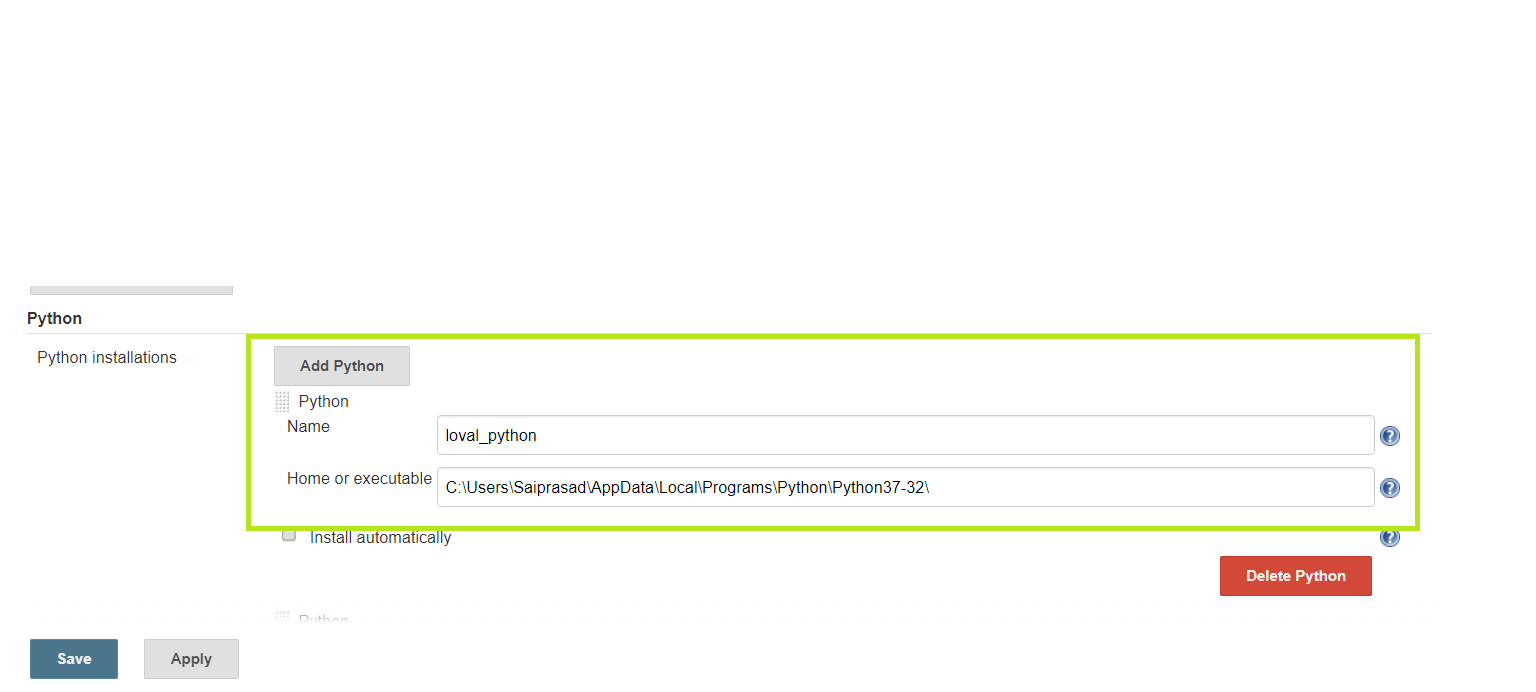
Now navigate to Global Tool Configuration which is under manage Jenkins. Scroll down and click on add Python under python.

Give the path of python installed location here and save it.

Now go Jenkins job and create a new job. Select the freestyle project.

Under SCM select your git repository. And add your git URL. My repo

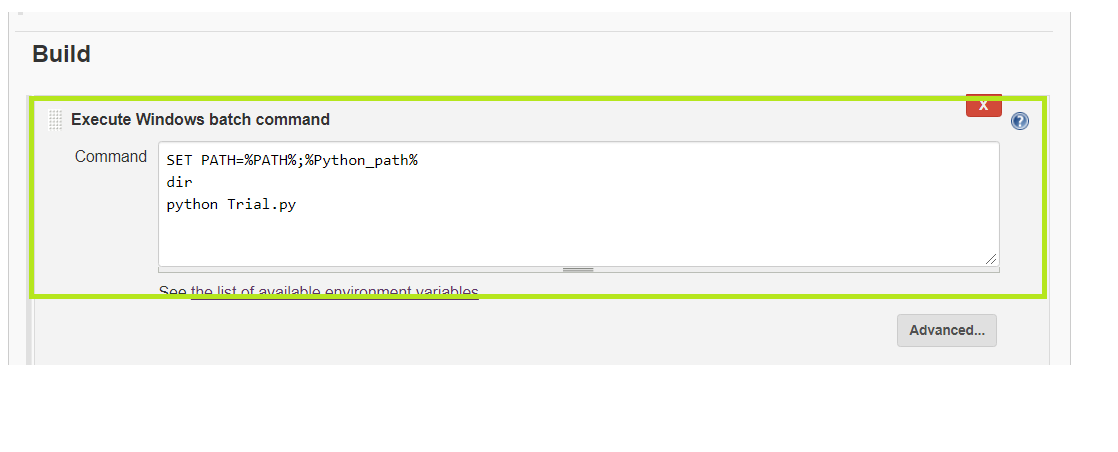
Underbuild section select Execute Windows batch command. And add the below command to set python path “SET PATH=%PATH%;%Python_path%”.

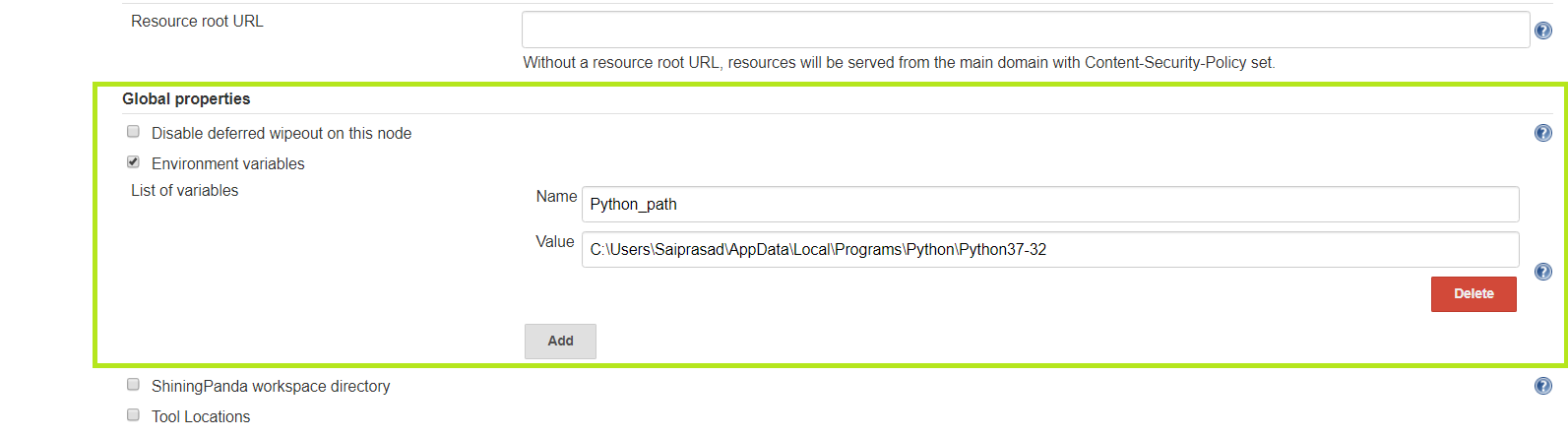
Python_path is variable, I have set this in Global properties under environment variable. Change it with your path.

And now add python command to run the file i.e, “python Trial.py”.Save it and click on a Build job.

The project will get executed and you can check the console log.

Hope this information has helped you.

What is this Agent Smith? Is it related to Matrix?

Recently a New virus has been found which is known as Agent Smith. This app hides like WhatsApp, Hotstar, Jiotv, Flipkart, Operamini and other apps.

This attack has occurred majorly in India, Pakistan and other Asian countries. Nearly 25million Android devices have been affected by this virus.

Agent Smith uses permissions which users blindly approve. The infected app modifies its name to something that looks more “authentic” like Google Updater or Google Themes or something else with Google in it.

And it also starts injecting its code into the bits of other popular apps like WhatsApp and Flipkart. This code is then used to serve more ads to users.

Now the question arises how to detect this virus. Well, you can’t detect it. But you can take precaution such as downloading the app from google play store and glance at the permissions the app is asking for, also if you are updating the app check the permission again before updating.

I know lots of users install the apps from 3rd party. After downloading the app upload it to VirusTotal and scan it. There is 62-64 antivirus on this server which will detect whether the app is safe or not based on that you can install it.

For more details visit this link

A critical flaw in Zoom video conferencing:

If you are using Zoom video conferencing then you need to read this.

Why Zoom is used?

Zoom is popular for cloud-based meeting platforms such as video, audio and screen sharing for users, And its free.

Recently a flaw has been found which exposes your webcam. If you uninstall zoom from your device even then the attacker can access your webcam.

For more details and Zoom’s response for this attack. click on the link

Is Android App safe?

Many of the Android apps have been collecting your data such as Messages, Calls, Location, Media and etc. There is a setting where you can block this permission for the apps. But is that sufficient?

Recently some of the applications have been caught collecting information even though you deny these application.

Researchers have reported these apps and bugs to Google. These bugs will be fixed once Andriod Q is rolled out. So until you receive update from google, turn off app permissions for the applications which are not needed.

For more details visit this link

Marriot Faces fine from GDPR:

The World’s biggest hotel chain Marriot International has been fined with $123Million under GDPR over 2014 data breach.
In 2018 November, Marriot detected that unknown hackers have comprised their guest reservation database through its recently acquired Starwood Hotels and got access to personal details of around 339 million guests
.

The attack leaked guests’ names, mailing addresses, phone numbers, email addresses, dates of birth, gender, arrival and departure information, reservation date, and communication preferences.

For More details visit this link.

To know more about GDPR . click on this link

How to connect and deploy application from docker container to EC2 instance

In this article, I will be showing how to run and deploy the angular project from Docker Container(Localhost) to the Amazon EC2 instance.

I have made a video and uploaded it on Youtube. This is the theoretical article.

First, I have taken a base Ubuntu OS in docker and installed Angular, Nodejs, JDK, Jenkins and created a new image, which I pushed to my repository. After doing that I ran my docker container by this cmd

docker run -it -d -p 8095:8080 -p 81:80 -p 50000:50000 image_id. For entering into container type this cmd

docker exec -it container_id bin/bash.

After entering into the container you will be logged in root user. Run this command “service Jenkins start”.You will get a message as Jenkins started on some pid number. If you are using a MAC OS the jenkins URL will be localhost and the port number which you entered when you started the container. I am running it on port 8095 so my URL will be “localhost:8095”. If you are using windows then your jenkins url will be 192.168.99.100: port number. it’s because of the NAT setting in the network.

Now create an EC2 instance using Ubuntu any version. I am using 18.04. log into instance. By default you will ubuntu user. Now run “sudo apt-get update” this cmd will update packages. And install apache2 in an instance.

“sudo apt-get install apache2 -y” by running this cmd apache will be installed. Now run “sudo service apache2 start” to start Apache service in an instance.

Now go to your docker container and switch to jenkins user. I have created a user called jenkins by using “useradd jenkins” cmd and set a password for the user by”passwd jenkins” cmd. To switch to jenkins user

“su – jenkins”. Now run “ssh-keygen” hit enter until you get the message that key has been created. Now this key will be under jenkins folder i.e, /usr/lib/jenkins/.ssh/id_rsa.pub. view that key by “cat /.ssh/id_rsa.pub” and copy that key. And go to ec2 instance, here you are logged in as ubuntu user run “ls -la”. You will find .ssh folder in your home directory. In that folder, there will be a file called authorize_keys open it and paste the key that you copied from your docker container by “sudo vi authorize_keys”. Once done go back to your docker container and run “ssh ubuntu@public-ip-address”. If everything is working fine you will be welcomed as ubuntu user inside ec2 instance. run “exit” to exit from ssh connection.

Now go to your jenkins url and create a new job or project. Under source management, select git. And add the git repository and under build section select “execute as shell”. And add these cmds “npm install”, “ng build”, “cd dist”, “tar -czvf new-name.tar.gz *”, “scp new-name.tar.gz instance-2-user@public-ip-address:folder” apply and save it. Now click on Build. The build is successful

.

 

How to spot an Scammer in online

In this article, we will be showing how to spot a scammer in the Digital world(Quickr, Telegram). You must have read in NEWS about people losing their money in quickr, Telegram.

First, what is a scam?

A scam is an attempt to defraud a person or group by gaining their confidence. So a person who does this is known as Scammer. I had heard that there were scammers in quickr. And found one easily.

Here I have uploaded a chat with one of the scammers who were in quickr. Now I am living in Bengaluru, India. So I have filtered the search for the ads within Bengaluru. I got attracted to the ads were the seller is selling iPhone X for 30K(INR). Now, who would sell an iPhone to such low amount?. Remember scammers always sell high budget products to a low amount, so that people would by the product from them.

Screenshots:

Here seller is from another country, but in ads, it says the seller is in Bengaluru. He is in hurry, so I bargained for 26K. which he accepted. Then he says that he will ship the product to me and I need to pay half amount in advance and the rest after the product is delivered. Then Seller calls me through Whatsapp call and he is talking in Nigerian accent. And is asking me how fast can I pay the money. He sends his account details which are from SBI(State Bank of India). And the number from which he is calling me is International Call. Now, how come a foreigner is having SBI account in INDIA. Here you can see how scammers are scamming people in name of the product. If I had gone ahead with the payment, he would have blocked me once I paid the amount.

Moral of the story: Always get confirmation from the seller whether She/He is from the same city or not. And chat with them by asking to send more pics of the device, accessories, and invoice. If they say that will send the product by courier. Then they are scammers.

What is carding?

Carding is a term describing the trafficking of a credit card, bank account and other personal information online as well as related fraud services.

Many of these(Carders) are in telegram and Instagram, where they say that they can get you any product in less amount. And like fools, many will fall for it and end up paying money. Once the carders get your money they just block you. Since they accept the money through Paytm, Paypal, BTC, or other eWallets we will not be able to trace them. Mark my words never deal with carders or scammers as you end up losing your money.

Note: This is a Research purpose only. Never deal with scammers or carders